Showing posts with label Social Media. Show all posts
Showing posts with label Social Media. Show all posts
Monday, April 23, 2012


Tuesday, April 10, 2012

Saturday, April 7, 2012
How to use Embedded Tweets
Learn how to use Embedded Tweets and increase the visibility of your tweets.
Embedded tweets are the new thing nowadays. It is used by almost every online marketer as a means of generating more communication for a tweet. It is a very creative way of exporting a tweet or a twitter conversation to another article. Be it a blog or a newspaper material or an email.
Embedded Tweets are nothing but having a tweet or a twitter conversation embedded on another media. By embedding tweets you can achieve feedback from people even out of twitter. Not everyone whom we want to interact are there on twitter, so this method helps us to engage those audiences as well.
The new twitter interface comes with a lot of facilities that many of us are yet to discover. Of course, not all of us are into the habit of probing and tinkering with anything/everything new. Embedded tweets are one of them. Many of us are not aware of this feature provided by twitter.
Here's how:
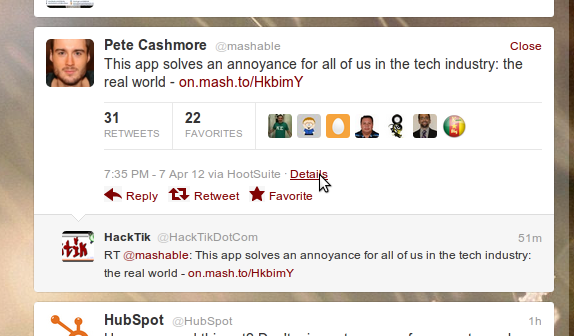
1. Choose a conversation and click 'open' it is located on the top right corner of a tweet. Once you've done that you'll see something like this :
 |
| this is an example tweet |
2. Then you click on the 'Details' option (see mouse pointer on above image). You will only see this option after opening the tweet.
Once you've clicked 'Details', a new window will open with all the details of the tweet.
3. Click on 'Embed this Tweet' Pic Below:
once again, this option is only available after clicking 'details' option.

4. After clicking 'Embed this Tweet' you'll see this:

Chose how you want your embedded tweet to look, adjust the positioning, and copy paste the code on your blog/article.
If you have Javascrpt enabled, then you'll see a tweet box just like the on you see on twitter, else you will only see something like this :
This app solves an annoyance for all of us in the tech industry: the real world - on.mash.to/HkbimY
— Pete Cashmore (@mashable) April 7, 2012
5. Another option for you would be to just share the link. This link will take you exactly to the particular tweet with all its details. Click this link to see the example : Link
It is the exact link you see in the below image:

Now its your turn to use embedded tweets in creative ways and get more out of your tweets and twitter conversations.
Thursday, April 5, 2012
Infographic: The Brain of Blogger
An amusing infograph of how a Blogger's brain works. The troubles are too real! I bet many can relate to it. (click image to enlarge)
 |
| source |

Wednesday, April 4, 2012
Infographic: Facebook Timeline [Branding]
What Branding pages need to know about Facebook Timeline.
Just about a week ago Facebook mandated Timeline for all Business/brand pages. Many of you may be struggling to understand the new 'timeline' view of your Facebook page. Here is an infograph explaining in detail of everything you need to know about the Facebook Timeline, for Marketing. Hope this helps you out.
Also Check out the 5 essential need to know aspects of Facebook Timeline : Click Here
Infographic: click image for larger view
 |
| Source |
Happy Marketing!
SEO: 4 Strategies for this Year.
Search Engine Optimization (SEO) is a wide field. The more you learn, the more there is left to learn.

SEO simply means to make your website visible in the eyes of search engines. Lots of tools and techniques exist that help aid search engines to locate your website/content. It is an ever changing field where a new concept emerges cancelling out the previous.
This is because the web, technology and the way it is used have not been constant but ever changing. This is why one needs to keep in touch with technology, else their knowledge becomes outdated. SEO is one of those areas where frequent monitoring of current trends come handy.
In SEO one must realize that each of us has our own way of marketing, what applies to one marketer or brand may not apply to all. Here are some SEO techniques that, in general, would create more visibility for your content.
1. New Content
The first thing most people (mostly techies) would notice is how recently was the article written. Its not only people but also search engines. Having fresh content is a sure fire way to up your listings on the search media. The more the content, the better the SEO results.
2. Relevant Content
This is an SEO concept many forget about.
Curating a website is a tedious job. And having too many unrelated articles packed in a site is even more tough, and confusing. Search Engines find it equally confusing too. SEO can be incredibly eased by making your website focus on only what needs to be. Try not to cloud your site with anything else than what is relevant.
3. Internal Links
Site optimization needs as much attention as SEO. SEO helps people land on your site, a well structured site helps keep those visitors, and have them come back too.
Having links to related topics as a part of the content can visitors cruise through your site and spend more time there.
4. Social Media Optimization
This is one sure way to get you noticed by Search Engines. The search media will see how socially active your page/brand is and will rate you accordingly. This is a new addition to the way of SEO. Before, social media marketing and search engine optimization were two separate ideas. Now they are intertwined and one tends to back the other.
So increase your presence in LinkedIn, Facebook, Twitter, Youtube. etc. and have the search engines to notice you.
Tuesday, April 3, 2012

Saturday, March 31, 2012
Infographic: How Social is B2B?
Business to Business Social Networking.
How much potential is there?
 |
| source |
Friday, March 30, 2012
Facebook Search Engine
A dedicated team of Facebook employees are working hard to build a Facebook Search Engine.
Or rather a Social Search Engine.

Facebook hasn't been giving much thought to search until now. We all know how useless searching for a person, a brand, or a group on Facebook can be. We usually resort to asking our friends for the concerned pages to make life easier. Looks like Facebook has finally caught up with this problem and has decided to create a Facebook Search Engine.
This search feature is to be purely concentrated on helping people to navigate themselves better through Facebook.
It is a known fact that Facebook monitors the activity's of its users from what they 'like' to all the status messages and links they share on their page. This is a massive amount of content that Facebook users, knowingly and unknowingly, create day in and day out. Facebook will surely take advantage of this massive data pool to aid in its Search Engine establishment. The only fact is that, even though there are many sources authenticating this news of Facebook Search Engine, Facebook itself considers it a rumor (this info itself is a rumor).
Currently Facebook uses the service of Bing for search.
 |
| Image source |
It is no doubt that Facebook considers Google+ its menial rival. Google Plus, even though not that successful comparing to Facebook, has an added advantage to it in terms of Search media. It has the super algorithmic efficiency of Google and its millions of users. By performance, if not fame, Google Plus is a tad bit more efficient than Facebook.
As for the matter of Facebook Search Engine, it is still under construction. When it is due is yet to be known. But it is sure to create a stir with its arrival. Creating an efficient search engine is no easy task and no one is good at it more than Google. Search is not something that is simple, and no one is good at it better than Google
Facebook surely has a long way to go with this. Lots of investment of both time and money are needed to achieve optimum results. Lets see how this major Facebook project is brought about.
Also read these two articles on Facebook Search Engine for more details:

Thursday, March 29, 2012

Facebook Timeline: 5 Things You Need to Know
Facebook is converting all Business brand pages to the 'Timeline' format by the end of this month, March 2012. (Although, some say it may change this Friday! 30th March 2012)

The new timeline feature from Facebook has gone through thorough inspection and scrutiny. Lots of raving comments, good, bad and unspeakable, have occurred. Many welcome the change whereas some dislike every aspect of it; there are also some who have shifted to timeline accidentally and are left perplexed (it cannot be undone). Converting your profile to 'timeline' can be easily done, all you need is a single click.
I personally welcome the 'timeline' and find the change rather interesting. There are many personal profiles as well as business brands that have already transitioned to the new 'timeline'. Eg: Red Bull, Burberry, Ubuntu etc.
The main reason it has attracted many criticism is because of its 'confusing' attributes. The 'timeline' needs a little getting used to. There are many new aspects that need tinkering with and also managing and locating certain known features can be a little time consuming. One does need to spend some time to learn what the 'timeline' is and how it portrays itself.
The best way to go about maybe through experimental learning but not everyone has time for that. Lack of time, happens to the best of us.
Below, I have listed the main features and what you need to know of the new 'Timeline'. I have cut through most of the nonsense and kept it as brief and up to the point.
1. The Cover Photo.
First things first. the moment you open the page, this is what catches you, a very creative 'aesthetic' factor of the new profile.
It is very important you keep the cover photo accordingly to its size, 850 x 315 pixels in dimension, get full force of the brand you depict.
And then there is this square area insert the cover photo where the profile picture is displayed. For brands this may be the location to put its Brand Logo.
A major point to note is the conditions that are set regarding the cover photo (for businesses). These are the things that are NOT to be displayed :
- Price/Discount/purchase/product information. Eg: you cannot display a 'download for free' ad as a cover photo.
- Words that provoke action, eg: "click this link " or "Spread the news" or "download now!"
- References to elements such as 'Like our Page!' and other profile features.
- Any type of Contact Information
Facebook is rather strict with these rules even though they may seem very anti-marketing and anti-promotional
NOTE: you should also be aware that the facebook landing page has been removed.
2. Changes in the 'About' Section.
There are now two ways in which you can showcase the 'about' section, either by
- Physical location

OR
- A mini Introduction

These two examples are only of the initial views, a fan/customer can view more details about the brand by clicking the 'about' button located below the introduction.
3. Profile Links Featured more Prominently.
The application boxes on that used to be on the side bar is now located on more prominently on right below the cover photo.

You can also see, from the above picture, the time-stamps. These help the viewer go to a certain time frame and see the posts and events that have taken place then. An excellent feature aiding 'research' I must say!
4. Pin a post for 7 days.
With the new timeline you can pin a post/page to the top of the timeline for up to 7days. These posts will have a bookmark like addition to the corner of the post. (pic below)

5. Highlights and Milestones
Highlights is one of the options of how you can chose to view the page. It is also the default manner in which the page is displayed.
You can select the way you want to view the page by clicking the 'highlights' button that is located below your cover photos and page links.

Milestones is a feature that helps add information of certain key points in time/milestones of your brand/business. This can be done exactly the way you would update your status.

Here is a view of an actual milestone on the Lexus page :

Wednesday, March 28, 2012
Infographic: Social Media vs Search Media
Who gets better priority, Social Media or Search Media?
Search Media is where a business should initially establish itself. This is the place one would initially try to locate a product or service and learn more about them. When it comes to brand awareness Search sites may take a back seat but is still a prominent area to establish itself. It is only later, when the basics of a business product or service are learned, a potential customer would try to locate the business on Social Media.
In certain areas though, Social Media gains priority over Search Media, here is an Infographic representation of the battle between Social media vs Search Media.

Image Source: MG Advertising
Tuesday, March 27, 2012
Infographic: The State of Social Media in Small Business
Infograph showing how small business are using Social Media.
source: http://www.infographicsarchive.com/social-media/small-business-stuck-in-neutral-on-social-media/

Monday, March 26, 2012
Infographic: Social Media Benchmark
A Graphical guide showing how Businesses are using Social Media Today.
Source : http://www.smbenchmark.com/
Subscribe to:
Posts (Atom)
